Feel free to steal my full life admin day checklist to help you be more productive this spring. A life admin day is your opportunity to step back, breathe, and get organized. It’s a set aside a day to handle all the list of life tasks you’ve been postponing. From reviewing your budget, clearing your inbox, or tidying up your digital life, to scheduling appointments and decluttering physical spaces. Think of it as your personal “reset” button to take control of your life’s logistics, so you can fully enjoy the months ahead.
For more wellness routines and rituals, check out:
- My Spring Bucket List Ideas
- Easy Ways to Simplify Your Life
- Spring Kitchen Refresh Checklist
- Spring Garden Checklist

Full Life Admin Day Checklist With Tasks and Ideas!
Ever feel like your brain has 47 tabs open, all screaming for attention? That’s the mental load. The invisible, ongoing to-do list we carry around. When we neglect our life admin tasks, this load doesn’t just vanish; it accumulates, leading to stress, anxiety, and even burnout. In fact, a study by Compare the Market found that 75% of Millennials experience stress related to life admin tasks, highlighting how common and overwhelming this burden can be. The consequences of this unchecked mental load are significant. Most commonly, constantly juggling uncompleted tasks can lead to heightened stress levels and anxiety.
The never-ending mental checklist can also interfere with sleep, making it hard to relax and recharge. Chronic stress from unmanaged life admin can manifest physically, leading to headaches, muscle tension, and even heart-related concerns.
But here’s the good news: dedicating time to a life admin day can alleviate this burden. I’m all about checklists. If there’s a way to simplify my life with a checklist, you better believe I’ve made one! Whether it’s a life admin day checklist, meal planning, or a simple to-do list for the week, I’ve probably got it written down somewhere. I swear, there’s something incredibly satisfying about crossing off tasks, and I find that a well-organized list keeps me on track and feeling in control. So if you’re looking for ways to stay organized, chances are, I’ve got the perfect checklist for you!
But before we get into the list of life admin tasks, let’s first explain the meaning of a life admin day and its myriad of benefits
What’s the Meaning of Life Admin Day?
Granted, life admin is the stuff we all have to do, but none of us gets excited about it. Think: paying bills, booking dentist appointments, canceling that free trial you forgot about (again), and finally replying to that email from three weeks ago. It’s not glamorous, but it’s what keeps your life ticking.
The Oxford English Dictionary defines life admin as “administrative tasks relating to the management of one’s personal life.” Pretty accurate. And Urban Dictionary, in a more tongue-in-cheek way, calls it “the soul-sucking tasks you put off for weeks because adulting is hard.” Also accurate.
In short, life admin includes all those little errands and to-dos that pile up in the background. It’s not work, and it’s not play it’s everything in between.
Having a dedicated life admin day is one of the best ways to take control of the chaos. It’s a chance to sit down, focus, and check off a long-overdue life admin checklist, from updating passwords to booking your next car service.
Whether you use a life admin planner, a notes app, or just your favorite pen and paper, planning a day to tackle these tasks can make a huge difference. And trust me, it feels so good to finally get it all done.
The Benefits of Having a List of Life Admin Tasks
Dedicating a specific day to tackle life admin tasks can have profound effects on your mental clarity, productivity, financial health, and personal growth. Let’s explore how:
Mental Clarity: Constantly juggling uncompleted tasks can lead to heightened stress and anxiety. By setting aside time to address these tasks, you free up mental space, leading to increased clarity and peace of mind. As noted by wellness experts, organizing your life admin can alleviate the mental load and reduce anxiety associated with disorganization and pending responsibilities.
Productivity Boost: Allocating a dedicated day for life admin tasks prevents them from interrupting your daily workflow, allowing you to focus more effectively on other responsibilities. This structured approach can enhance overall productivity and efficiency.
Financial Health: Regularly reviewing and managing your finances, such as budgeting, monitoring subscriptions, and planning for future expenses, during your life admin day can lead to better financial stability and prevent unnecessary expenditures. This proactive approach guarantees you’re in control of your financial well-being.
Personal Growth: Using your life admin day to set and review personal goals, schedule health check-ups, or plan for upcoming events supports your overall well-being and personal development.
How to Plan a Life Admin Day
You’ve decided to have a life admin day—amazing! But before you get into your life admin checklist, a little prep can go a long way. Here’s how to set yourself up for success:
Choose the Right Day
Pick a day when your schedule is light and distractions are low. For some, that’s a Sunday morning with coffee; for others, a midweek afternoon works better. The goal is to give yourself uninterrupted time to get things done. Don’t overbook! Life admin tasks need your full attention, even if they’re small.
Some people even schedule a recurring monthly or seasonal life admin day. That way, tasks like budgeting, booking appointments, or unsubscribing from spam emails never get too out of hand.
Gather the Right Tools
Whether you’re a pen-and-paper person or a digital planner fan, gather your tools ahead of time. Some essentials:
- A notebook or your favourite life admin planner (I shared my favourite daily planners in a previous article)
- A printed or digital life admin checklist
- Your phone (for calls, apps, reminders)
- Laptop or tablet (for emails, bill payments, digital organizing)
Digital apps like Notion, Trello, or Google Keep can help keep your life admin tasks all in one place. Think subscriptions to cancel, documents to organize, or appointments to reschedule. I will share a list of my favorite apps later on in this article.
Set the Environment
Create a space that feels calm, focused, and motivating. Clear your desk, light a candle, put on a playlist (instrumental works best for me!), and silence notifications.
Make your life admin day feel intentional, not a chore. A cozy setup can shift your mindset and make the day feel more like self-care than an overwhelming to-do list.
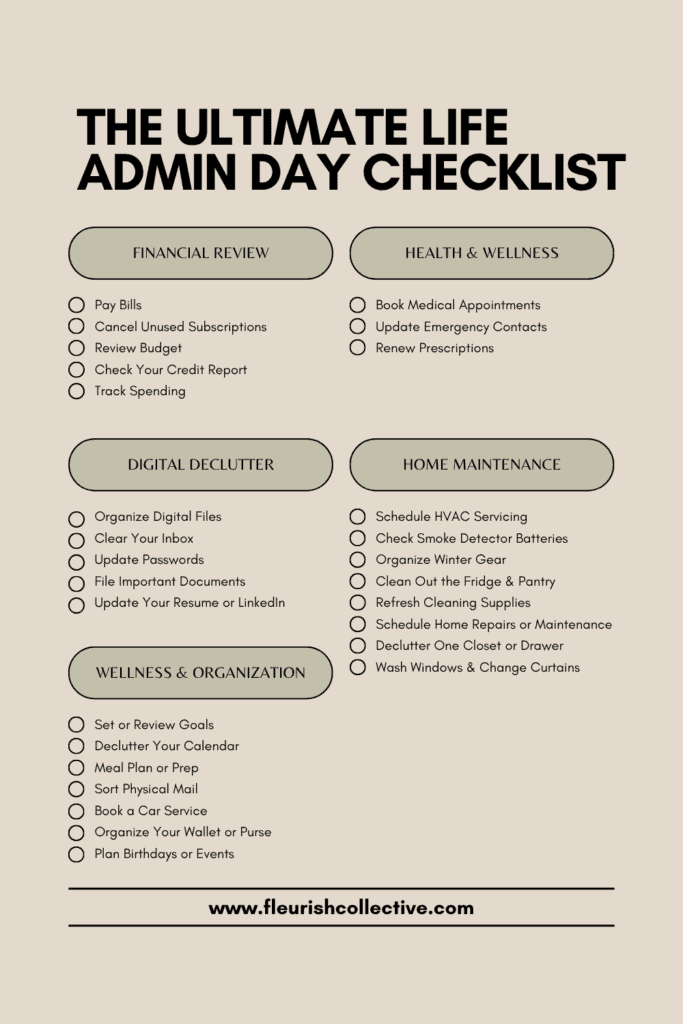
The Ultimate Spring Life Admin Day Checklist
Financial Review
- Pay Bills: Make sure utilities, rent/mortgage, credit cards, and any other recurring payments are up to date.
- Cancel Unused Subscriptions: Check streaming services, apps, or memberships you don’t use—and cancel to save money.
- Review Budget: Look over your income and expenses to see where your money is going. Adjust if needed.
- Check Your Credit Report: Review your credit history to ensure everything is accurate and no fraud has occurred.
- Track Spending: Use a finance app or spreadsheet to get clarity on your daily/weekly expenses.
- Renew Prescriptions: Make sure you’re stocked up on any essential meds and that prescriptions are current.
Health & Wellness
- Book Medical Appointments: Schedule check-ups, dental cleanings, eye exams, or any overdue health visits.
- Update Emergency Contacts: Make sure your phone, workplace, or school records have current contact info.
Digital Declutter
- Organize Digital Files: Sort your desktop, clean up downloads, and back up important files to the cloud or an external drive.
- Clear Your Inbox: Unsubscribe from unwanted emails, respond to overdue messages, and archive or delete the rest.
- Update Passwords: Change passwords for sensitive accounts and store them in a secure place or password manager.
- File Important Documents: Organize things like tax papers, health insurance, and warranties in a digital or physical folder.
- Update Your Resume or LinkedIn: Even if you’re not job hunting, keeping these up to date is always a good idea.
Wellness & Organization
- Set or Review Goals: Take a moment to set monthly or seasonal goals—or check in on the progress you’ve already made.
- Declutter Your Calendar: Remove outdated events, reorganize schedules, and block off time for rest or creative projects.
- Meal Plan or Prep: Plan out meals for the week to save time and reduce food waste. Check out my weekly meal planning routine for inspiration.
- Sort Physical Mail: Open, file, and toss anything that’s been piling up. Handle anything urgent.
- Check Your Car: Book a service, check your registration, or schedule a tire rotation or oil change.
- Organize Your Wallet or Purse: Toss old receipts, expired gift cards, and random items that don’t need to be there.
- Plan Birthdays or Events: Check your calendar and prep cards, gifts, or RSVPs for any upcoming celebrations.
Home Maintenance
- Schedule HVAC Servicing: Book an HVAC check-up to ensure your heating and cooling systems are running efficiently before temperatures shift.
- Check and Replace Smoke Detector Batteries: A small but critical task. Do it every season to stay safe and compliant.
- Organize Winter Gear & Prep Spring Essentials: Wash and store winter coats, boots, and snow gear. Bring out spring clothes, shoes, gardening tools, and sunscreen.
- Clean Out the Fridge & Pantry: Toss expired items, wipe down shelves, and make room for fresh seasonal staples.
- Refresh Cleaning Supplies: Take stock of what non-toxic cleaning supplies you’re low on—refill dish soap, laundry detergent, sponges, all-purpose cleaners, etc.
- Schedule Home Repairs or Maintenance: Anything you’ve been putting off? Now’s the time—roof checks, leaky faucets, chipped paint.
- Declutter One Closet or Drawer: Pick one area to tackle. Small wins = big momentum. I shared my detailed closet decluttering checklist to help you get started.
- Wash Windows or Change Curtains: Let the light in! Clean windows inside and out with a natural glass cleaner, or freshen up window coverings.
My Favourite Tips for a Successful Life Admin Day
If you’re anything like me, even with the best intentions, life admin day can quickly spiral into snack breaks and scrolling. Over time, I’ve figured out a few tricks that make a huge difference, so here are my go-to tips for getting things done without burning out.
Time Block Your Tasks
Break your life admin checklist into categories, like finances, health, digital cleanup, and home, and assign each a specific time slot. I like to give each category 30–60 minutes and set a timer. It keeps me focused and way less overwhelmed.
(Pro tip: leave a little buffer between blocks in case something takes longer than expected.)
Avoid Burnout with Breaks + Rewards
You’re not a machine. Build in short breaks to stretch, get some fresh air, or grab a snack. I love using the Pomodoro Technique—25 minutes on, 5 minutes off. And yes, I fully support rewarding yourself after each block (hello, fancy coffee, or a walk in the sun).
Stay Flexible
Even with a perfect life admin planner, life can be… life. If something takes longer or you hit a roadblock, it’s totally okay to pivot. The goal isn’t perfection, it’s progress. Your list of life admin tasks can always roll over to next month.
Find Accountability
Sometimes the best motivation is doing it with someone else. I’ve done life admin day with a friend over FaceTime—we check in at the start, mute each other while we work, then chat again at the end. It makes it way more fun and keeps you on track.

11 Best Life Admin Apps
No one said adulting was easy, but with the right tools, it can be less chaotic. One of the most important life admin hacks is having apps to help you get through the day. Try mixing and matching a few of these apps to build your ultimate life admin system. Whatever works best for your brain and your lifestyle.
- Notion: An all-in-one workspace where you can create a customizable life admin planner, checklists, goal trackers, and even store important docs. Great for both personal and family use.
- Todoist: A simple yet powerful task manager. Break down your list of life admin tasks into categories, set deadlines, and get reminders so nothing falls through the cracks.
- Trello: Visual, drag-and-drop boards make organizing your tasks satisfying (and kind of fun). Ideal for planning your entire life admin day at a glance.
- Google Calendar: Perfect for time blocking, scheduling appointments, and setting recurring reminders. Sync it across devices and share it with family or partners for maximum efficiency.
- Evernote: Your digital notebook. Great for storing to-do lists, receipts, appointment info, or brainstorming personal goals.
- YNAB (You Need a Budget): One of the best budgeting apps for taking control of your finances—perfect for the financial side of life admin like tracking spending, managing bills, and planning ahead.
- Mint: Another excellent free budgeting app that syncs with your bank accounts and categorizes expenses. A solid go-to for monthly financial check-ins.
- Unroll.Me: Declutter your inbox in seconds. This app shows you all your email subscriptions and lets you unsubscribe with a single tap.
- Calm or Headspace: Because managing the mental load is part of life admin too. Use a short meditation break between tasks to reset your energy.
- Cozi Family Organizer: Perfect for families juggling shared tasks, calendars, and grocery lists. Everyone stays in the loop (and maybe even helps with life admin).
This Was My Life Admin Day Checklist With 20+ Tasks
This was the list of life admin tasks I’m using every single month. Taking a step back to focus on life admin might not sound glamorous, but it’s one of the most powerful ways to reclaim your time, energy, and peace of mind. From decluttering your inbox to organizing your finances and booking those long-overdue appointments, a dedicated life admin day helps you clear the mental fog and make space for what truly matters. Here’s your gentle nudge: schedule your own life admin tasks this week (or month!). Use a life admin checklist, grab your favourite planner or app, and set yourself up in a cozy space. Start small if you need to—just one or two tasks in your life admin routine is still a win.